Team access
Each teammate works on their own clients, and you decide who sees which.
How it works: Team access
Features · Run your agency
Set what each client’s package includes, such as “SEO, 10 keywords”, and a price per extra keyword.
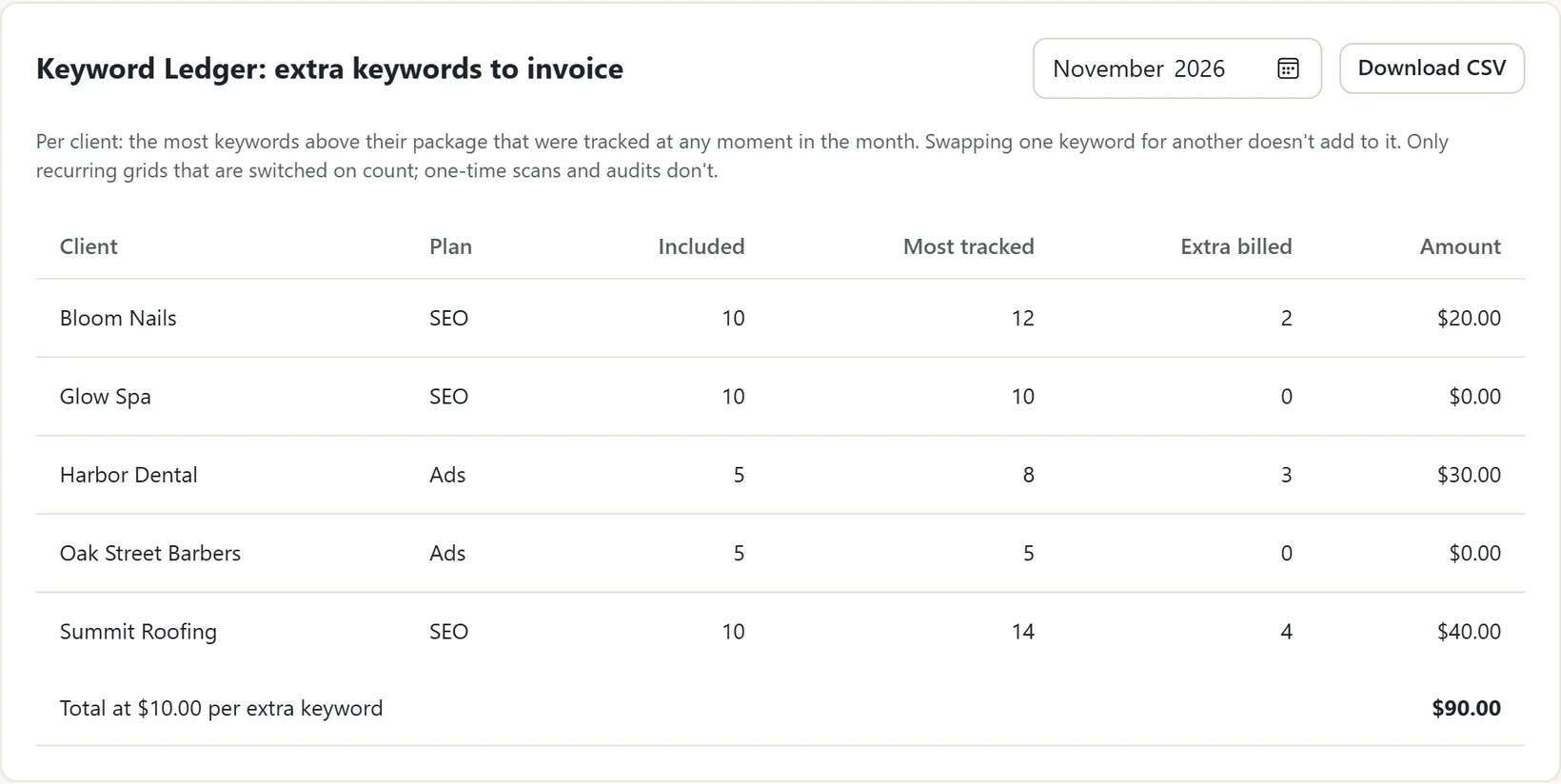
You get A month-end list of extra keywords to invoice, so billable work doesn’t slip.
1,000 free credits, no card · valid for 30 days
Last updated · Written by the Local Pinmeter team in Phoenix, Arizona
 (opens full size in a new tab)
How it works
When a client is tracked on more, Keyword Ledger counts it, and at the end of the month you get the list of extras to put on each invoice.
In detail
What it costs
Keyword Ledger costs nothing extra. It counts keywords on scheduled grids, which need a paid plan, so the month-end list starts with your first paid month. The price per extra keyword is your own price to your clients, not a Local Pinmeter charge.
Scans use 1 credit per pin, for each keyword; a Live scan, the faster choice under Advanced, uses 2.5.
Work out your credits · Plans and pricing
1,000 free credits, no card · valid for 30 days
What sets it apart
| What matters | By hand | Local Pinmeter |
|---|---|---|
| Knowing who is over their package | Count each client’s keywords in a spreadsheet | Counted for you, client by client, every month |
| Adding keywords past the package | Nobody notices until the invoice is wrong | The app asks to confirm first and names the amount it adds to that client’s bill |
| A keyword swapped mid-month | Argue about it later | The highest count in the month is billed; swapping one keyword for another is free |
| The month-end list | Rebuild it from memory | One card with a month picker and a CSV: client, plan, included, most tracked, extra billed, amount |
Keyword Ledger works out what to invoice; your agency sends the invoice. Local Pinmeter never bills your clients.
FAQ
No. Keyword Ledger works out what to invoice each client; your agency sends the invoice.
Swaps are free. The highest number of keywords tracked in the month is what counts.
Yes. Pause it: it stays on the grid with its history, is skipped by runs and isn’t counted toward the package.
The workspace owner. Viewers don’t see the invoice list.
Trust every pin.