Market analysis
An action plan your client can follow, with the numbers behind every step.
How it works: Market analysis
Features · Track Maps and AI
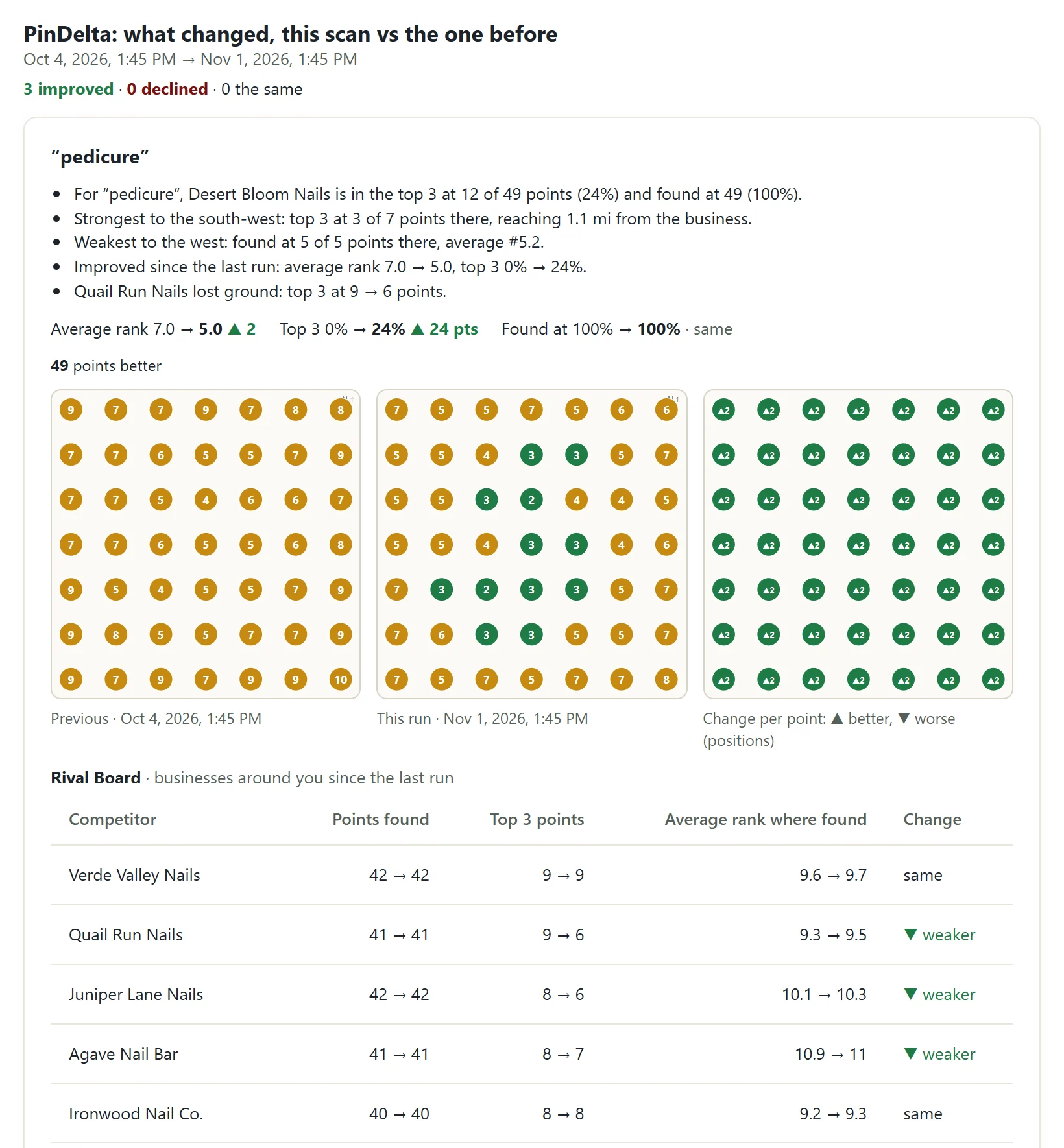
Every scan is set against the one before it, keyword by keyword.
You get A ready-to-forward answer to “what did you do for me this month?”
1,000 free credits, no card · valid for 30 days
Last updated · Written by the Local Pinmeter team in Phoenix, Arizona
 (opens full size in a new tab)
How it works
You get the map before and after, the pins that got better or worse, the competitors who moved past your client or fell behind, and a sentence for each change. It answers the question every client asks.
In detail
What it costs
PinDelta is worked out from the scan you already ran. The only credits are the scan’s own. The email after a scheduled scan is free too.
Scans use 1 credit per pin, for each keyword; a Live scan, the faster choice under Advanced, uses 2.5.
Work out your credits · Plans and pricing
1,000 free credits, no card · valid for 30 days
What sets it apart
| What matters | Other trackers, or by hand | Local Pinmeter |
|---|---|---|
| A written read-out of a scan | One well-known tracker charges 25 credits for its AI analysis of a scan | A plain-words summary after every scan, at no extra credit cost |
| Who moved | By hand: set two scans side by side and look for the businesses that changed places | Each change names the competitors who moved past your client or fell behind, so you know where to work next |
| Before and after | By hand: two screenshots side by side and a guess at what moved | The two maps side by side, a map of every pin that got better or worse, and the counts: better, worse, new, lost, same |
| Telling the agency | By hand: open every client’s report to look | After each scheduled scan, an email to owners and to managers who ask for it, with a line for up to 10 keywords |
AI analysis: our own look at one well-known tracker’s app, October 16, 2026. No tracker is named, and it may have changed since.
FAQ
The “what changed” report that comes with every scan after the first. It sets the scan against the one before it on the same grid and says, keyword by keyword, what moved and who moved past your client.
The first run of a grid is the starting point. From the second run on, each one is compared with the run before it.
Not this one. The scan notification after a scheduled scan goes to the agency’s owners and to managers who ask for it, never to clients. A client gets email only if you switch on the client report email for them: their report every month or every week, in your agency’s name. You can also send the share link or the PDF yourself.
No. It is worked out from the scan you already ran, so it uses no extra credits.
Yes. “Compare runs” puts up to 8 scans side by side, and then → now works against the last scan, 30 days ago or any date.
Trust every pin.